



Mit einem Template Override passen Sie die HTML-Ausgabe einer Joomla Komponente, eines Module oder eines Layouts an, ohne die Originaldateien des Core oder der Extension zu verändern. Beim Aufbau einer Seite prüft Joomla zuerst, ob Ihr aktives Template einen Override enthält. Gibt es einen passenden Override, nutzt Joomla diese Datei statt der Standardausgabe der Komponente oder des Module.
Core-Dateien von Joomla direkt zu bearbeiten ist riskant, weil diese Änderungen bei jedem Update von Joomla oder der Extension überschrieben werden. Template Overrides lösen dieses Problem, denn sie speichern Anpassungen im Ordner Ihres Templates, den Updates nicht berühren. So bleiben Ihre Änderungen dauerhaft erhalten.
Template Overrides sind immer dann nützlich, wenn das Standardlayout Ihre Anforderungen nicht erfüllt. Ob Sie zusätzliche Informationen anzeigen, unnötige Elemente entfernen oder die Ausgabe komplett neu aufbauen möchten: Overrides geben Ihnen die Freiheit, die Darstellung anzupassen und dabei update-sicher zu bleiben.
So funktioniert es
Melden Sie sich im Joomla Backend an und gehen Sie zu System → Website Templates → Ihr Template wählen.
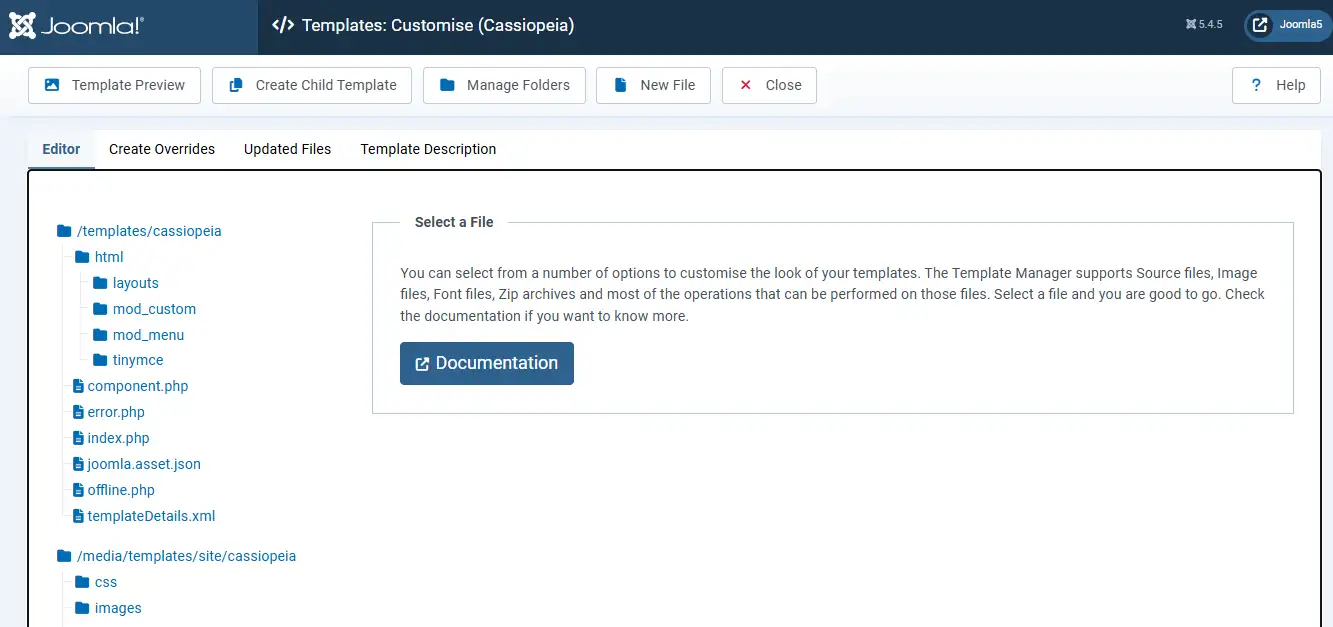
Sie gelangen zur Ansicht für die Anpassung des Templates, wo Sie Template Overrides anlegen und verwalten.
Wichtiger Hinweis
Bearbeiten Sie die Originaldateien des Templates nicht direkt. Die Standard-Templates von Joomla wie Cassiopeia enthalten eingebaute Dateien, die bei künftigen Updates ersetzt werden können. Direkte Änderungen an diesen Dateien gehen verloren, sobald Joomla neuere Versionen installiert.
Der Ordner html in Ihrem Template enthält alle Override-Dateien. Dort können Sie vorhandene Overrides ansehen, bearbeiten oder erweitern.
1. Overrides anlegen
Öffnen Sie in der Ansicht für die Anpassung des Templates den Tab Overrides erstellen.
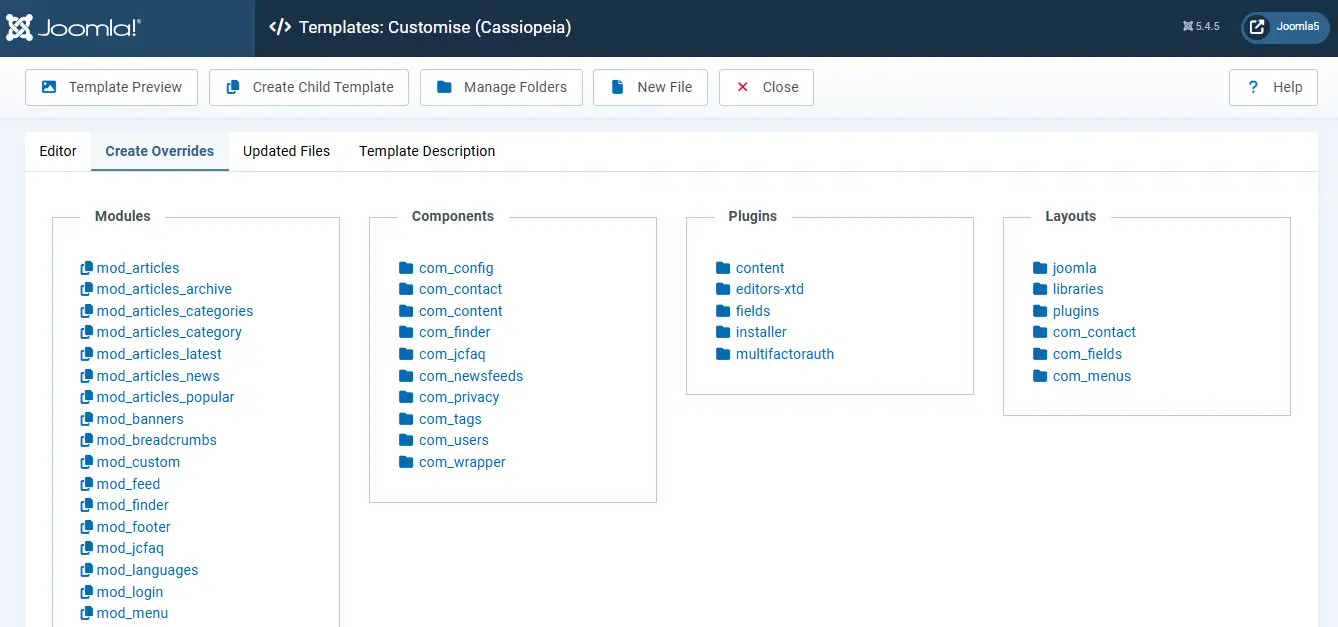
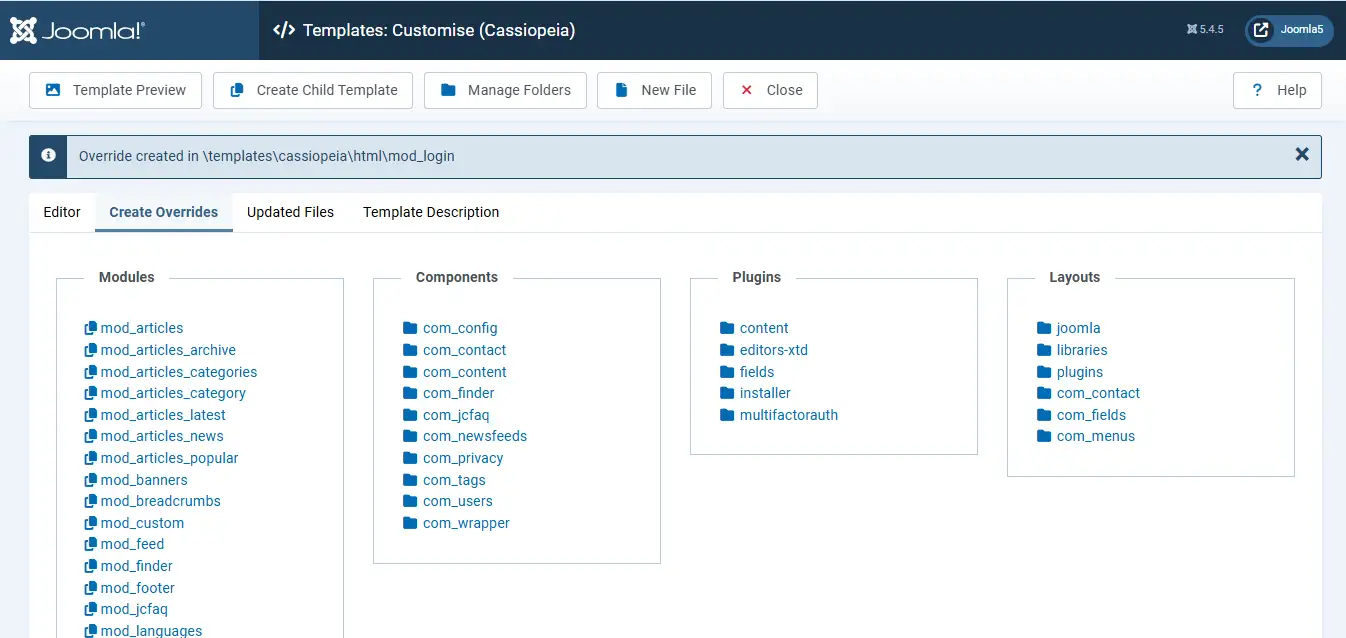
Wählen Sie das Element, das Sie überschreiben möchten, etwa eine Komponente, ein Module, ein Plugin oder ein Layout. Möchten Sie zum Beispiel das Module Anmeldung anpassen, wählen Sie mod_login im Bereich Module. Joomla legt automatisch eine Kopie der nötigen Dateien im Ordner html Ihres Templates an.
2. Die Datei bearbeiten
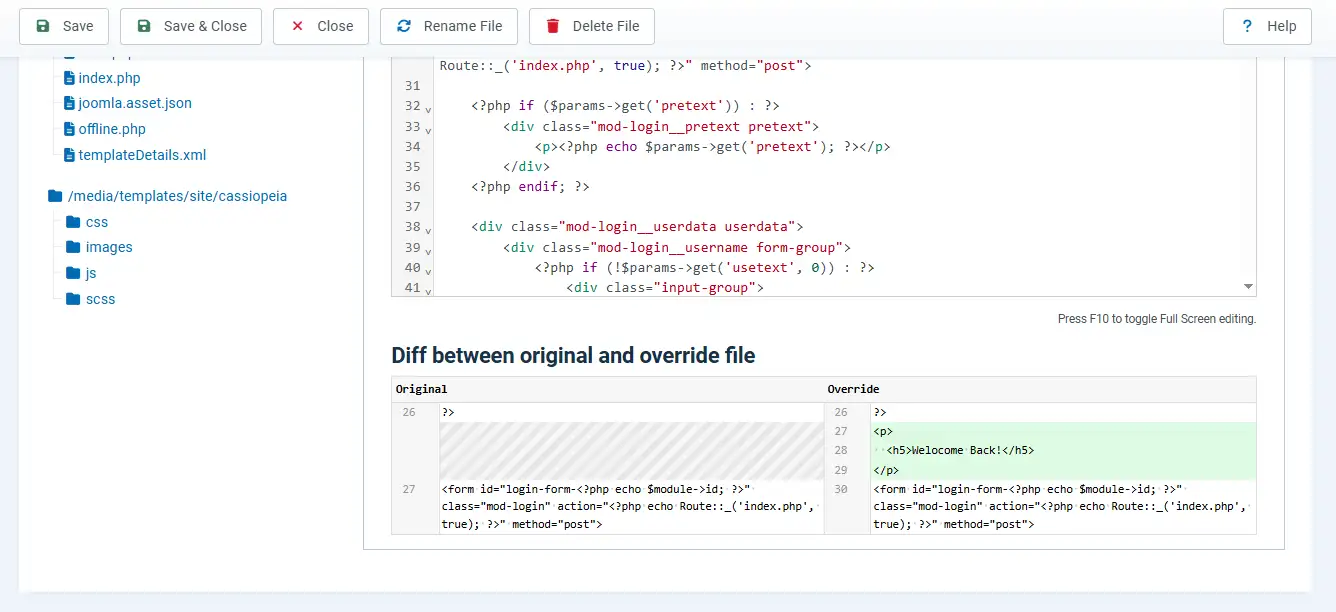
Öffnen Sie im Tab Editor den Ordner html, um auf Ihre Override-Dateien zuzugreifen.
Bearbeiten Sie die erzeugten Dateien, um die Ausgabe anzupassen. Möchten Sie einen Override entfernen und zur ursprünglichen Ausgabe von Joomla zurückkehren, wählen Sie die Datei und nutzen Sie die Option Datei löschen.
Mit den Werkzeugen Originaldatei anzeigen und Unterschiede anzeigen vergleichen Sie Ihre angepasste Version ganz einfach mit der Originaldatei von Joomla.
Brauchen Sie Hilfe bei Joomla Template Overrides?
Ob eigene Layouts für Beiträge, Overrides für Module, Anpassungen an Komponenten oder update-sichere Designänderungen: Unsere Joomla Experten helfen Ihnen, saubere Lösungen mit Overrides aufzubauen und zu pflegen, ohne Core-Dateien anzufassen.
Joomla Hilfe anfordern
3. Im Frontend prüfen
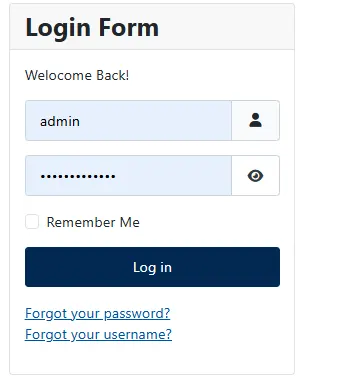
Prüfen Sie nach Ihren Änderungen das Ergebnis im Frontend Ihrer Website.
Wird das Module noch nicht auf der Website angezeigt, gehen Sie zu Inhalt → Website Module, legen Sie das Module an oder suchen Sie es, weisen Sie eine Position zu und speichern Sie.
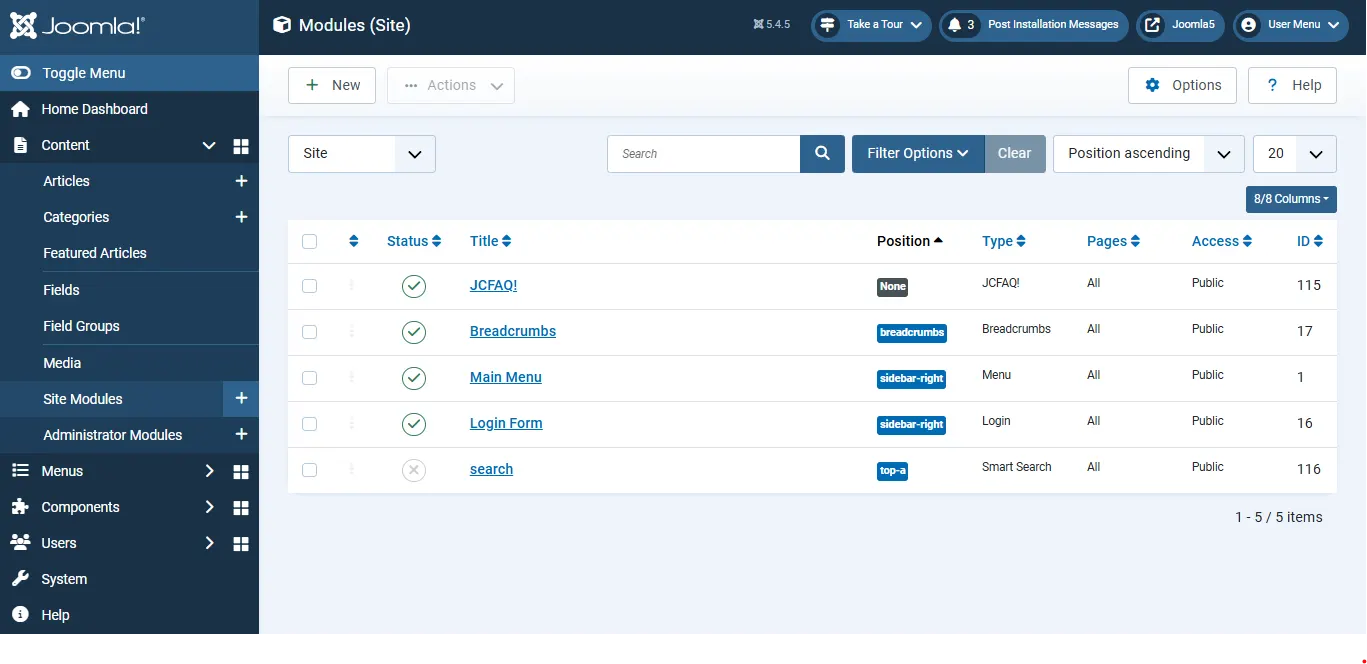
Ist das Module veröffentlicht, rufen Sie das Frontend auf und prüfen Sie, ob Ihre angepasste Ausgabe wie erwartet erscheint.
Vorteile von Template Overrides
Änderungen überstehen jedes Update
Einer der grössten Vorteile von Template Overrides ist die Sicherheit bei Updates. Bei jedem Update von Joomla oder einer Extension werden deren Dateien ersetzt. Da Overrides im Ordner html Ihres Templates liegen, bleiben Ihre Anpassungen geschützt.
Volle Freiheit beim Design
Overrides geben Ihnen volle Kontrolle über die HTML-Ausgabe. Sie können die Struktur anpassen, eigene CSS-Klassen ergänzen, unnötiges Markup entfernen und die Ausgabe an Frameworks wie Bootstrap, Tailwind oder Ihr eigenes Designsystem angleichen.
Funktioniert für Komponenten, Module und Plugins
Template Overrides sind nicht auf einen Bereich von Joomla beschränkt. Sie wirken bei Beiträgen, Kontaktseiten, Anmeldeformularen, Menüs, Breadcrumbs, Seitennavigation und vielen anderen Teilen des Systems.
Mehrere Layouts für denselben Inhalt
Joomla erlaubt alternative Layouts für denselben Inhalt. Sie können zum Beispiel eine Raster- und eine Listenansicht anbieten und für jeden Menüeintrag wählen, welches Layout erscheinen soll.
Bessere SEO und Barrierefreiheit
Mit Overrides ergänzen Sie semantisches HTML, Attribute für Barrierefreiheit und strukturiertes Markup genau dort, wo sie gebraucht werden. Das verbessert Bedienbarkeit und Sichtbarkeit in Suchmaschinen.
Keine zusätzlichen Extensions nötig
Template Overrides sind direkt in Joomla eingebaut. Sie brauchen keine Extension von Drittanbietern, die Funktion steht in jeder Joomla Installation bereit.
 Brauchen Sie Hilfe bei fortgeschrittenen Anpassungen in Joomla?
Sie brauchen mehr als einen einfachen Template Override? Von eigenen Layouts und dynamischen Inhaltsanzeigen bis zu komplexen Anpassungen an Joomla Komponenten und Modulen hilft Ihnen unser Team, skalierbare, update-sichere Lösungen für Ihre Website zu bauen.
Joomla Hilfe vom Experten anfordern →