


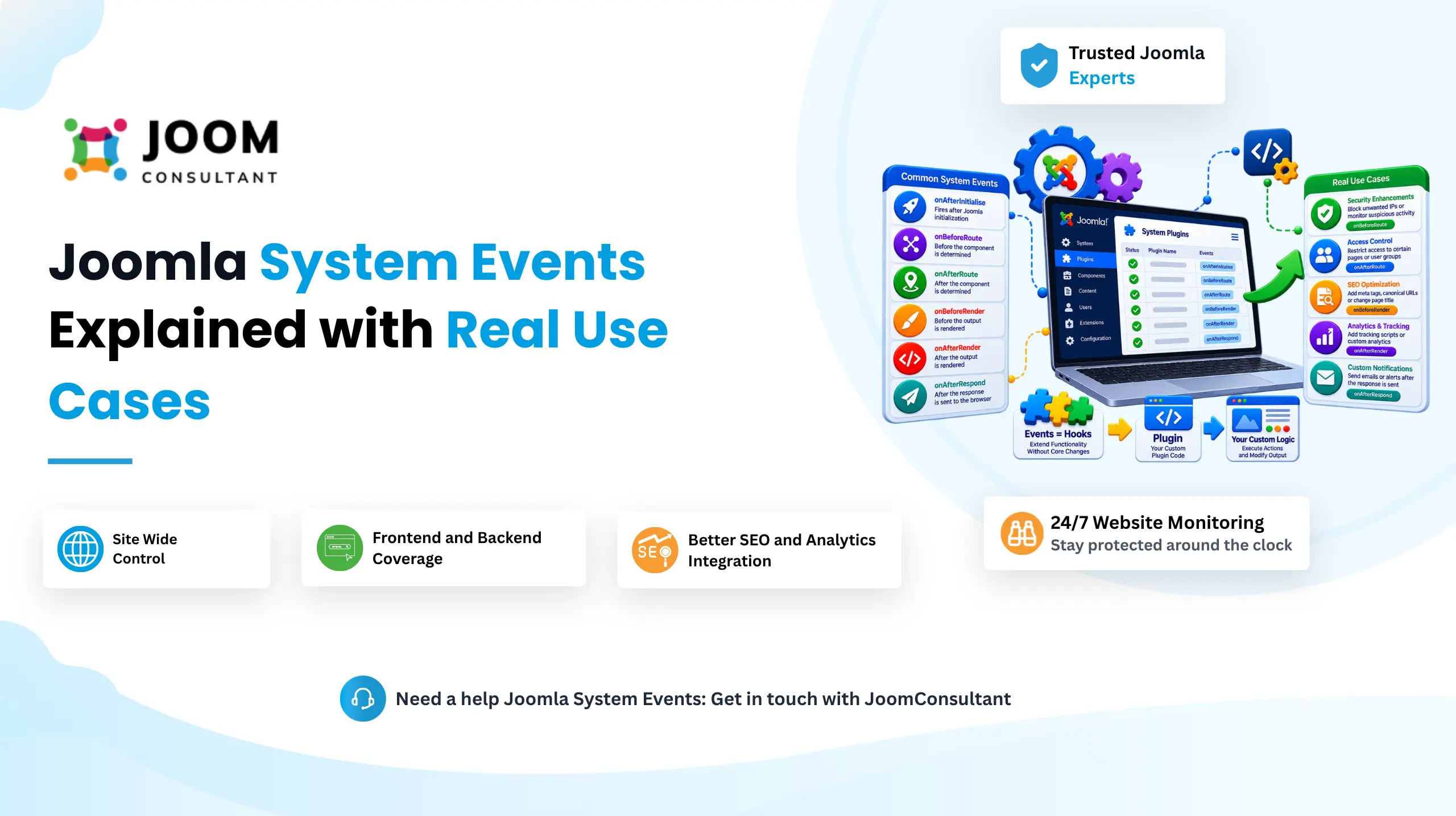
When people start working with Joomla extensions people usually find components, modules and plugins. Components and modules are the parts you can see on a website. Plugins do their work, behind the scenes. Plugins quietly listen for events and then act automatically whenever those events happen.
A plugin in Joomla is an simple tool that works when a certain thing happens in the system. For example a plugin can do something when a user signs in, when an article is stored or when a web page is being shown. Unlike modules or components, plugins do not have to be added to a page, on purpose. They just. Watch for an event and then do what they are supposed to do when that event happens.
If Joomla had no plugins Joomla would have to pack every feature straight into Joomlas core. That would make Joomla larger, harder to maintain and more difficult to update. Instead Joomla adopts event driven architecture. Joomla allows developers to safely add features and Joomla stays safe because developers do not touch Joomlas core files.
Joomla provides several categories of plugin events, including Content Events, User Events, Authentication Events, Search Events, and System Plugin Events. Among these, System Plugin Events are some of the most powerful because they interact directly with Joomla's application lifecycle and can affect the entire website.
What Are Joomla System Plugin Events?
A System Plugin is a Joomla plugin that runs on global application events. Unlike content plugins that only react to articles or user plugins that focus on user-related actions, system plugins can execute on nearly every page request across the website.
Because they operate at the application level, system plugins are commonly used for:
- Loading analytics or tracking scripts across the entire website
- Adding custom CSS and JavaScript files
- Managing redirects and URL rewriting
- Implementing security checks and IP filtering
- Controlling maintenance mode
- Adding SEO related functionality
- Logging and debugging site activity
- Applying global business logic across the frontend and backend
Since these plugins run throughout the Joomla application, they are ideal for features that need to work consistently across the entire site rather than within a single component or page.
System Plugin Events
1. onAfterInitialise
The onAfterInitialise event is one of the events, in Joomlas execution process. The onAfterInitialise event runs immediately after Joomla has finished initializing. It runs before routing, URL processing or content rendering begins.
Because the onAfterInitialise event executes early the onAfterInitialise event is often used for tasks that need to happen before Joomla begins processing the requested page.
Common Real-World Uses
1. Force HTTPS Across the Website
A developer can check whether a visitor is using an insecure connection and automatically redirect them to HTTPS before any content loads.
2. Security and IP Filtering
Suspicious IP addresses, bots, or unwanted traffic can be blocked before Joomla spends resources processing the request.
3. Session and Authentication Handling
Developers often use this event to initialize user sessions, process cookies, or prepare custom authentication logic.
4. Global Configuration
Site wide variables and constants can be set here so other extensions can use them later during execution.
5. Language Detection
Before Joomla determines what content to display, this event can help identify the visitor's preferred language and prepare the application accordingly.
Need Help Building Custom Joomla System Plugins?
Whether you need custom event handling, security checks, redirects, analytics integration, or advanced Joomla plugin development, our Joomla experts can help you build scalable and update-safe solutions.
Get Joomla Help
2. onAfterRoute
The onAfterRoute event happens after Joomla looks at the URL and figures out which component, which view and which menu item should take care of the request.. The chosen component hasn't been displayed yet.
This is a spot to look over the page you asked for. You can make all the decisions you need to before the page content is created.
Common Real-World Uses
1. Route Based Access Control
Keep pages or parts of the site hidden from people unless they have the right role or permission. This keeps everything secure. Ensures that each person only see the things they are supposed to see.
2. Redirect Legacy URLs
Automatically redirect old article URLs to newer URLs after a site restructure.
3. Language Specific Routing
Apply custom multilingual logic depending on the route being requested.
4. Component-Specific Processing
Run custom code only when certain components are requested, such as:
- com_content
- com_users
- Custom Joomla components
These targeted checks help improve efficiency because the plugin only executes its main logic when necessary.
Important Note
Avoid loading document-related objects too early inside onAfterRoute(). Joomla document instance should not be initialized at this stage because it may interfere with the normal rendering process.
Note:
Don't use Factory::getApplication()->getDocument(), Factory::getDocument(); or HTMLHelper/JHtml methods in function onAfterRoute() that instantiate the Document too early.
3. onAfterDispatch
The onAfterDispatch event runs after Joomla has handed the request to the appropriate component and completed its dispatch process. At this point, Joomla already knows what content should be displayed and has completed the component's processing logic.
Common Real-World Uses
1. Process Component Data
Inspect or modify data generated by the component before Joomla renders the final page.
2. Execute Component-Specific Logic
Run custom actions only when specific components have completed processing.
3. Additional Pre-Rendering Tasks
Perform custom calculations or processing before the final HTML is generated.
4. Integrate External Systems
Collect data from the dispatched component and send it to external APIs or reporting systems.
Difference Between onAfterRoute and onAfterDispatch :
onAfterRoute → Joomla has determined what page should be loaded, but the component has not yet been executed.
onAfterDispatch → The component has already completed its processing, and you can now work with its generated data before rendering occurs.
4. onBeforeRender
The onBeforeRender event runs immediately before Joomla generates the final page output. By this stage, Joomla has completed initialization, routing, and component processing.
This is often the best place to make final page-level adjustments.
Common Real-World Uses :
- Add CSS Files : Load custom stylesheets before the page is displayed.
- Add JavaScript Assets : Include custom JavaScript files or frameworks.
- Set SEO Metadata : Update page titles, descriptions, keywords, and other metadata.
- Modify Document Settings : Adjust document properties before Joomla creates the final HTML.
- Customize Page Titles : Dynamically generate page titles based on the current page or business rules.
Typical examples include adding CSS, loading assets, or changing the browser title dynamically.
5. onAfterRender
onAfterRender event is triggered after Joomla has generated the complete HTML response but before it is sent to the visitor browser.
Because final HTML already exists, developers can inspect and modify the output directly.
Common Real-World Uses :
- Find and Replace Content
Replace specific words, phrases, or HTML snippets throughout the page. - Inject Custom HTML
Insert banners, announcements, or promotional blocks into the final output. - Add Custom JavaScript
Inject scripts into the rendered HTML without modifying templates. - Remove Unwanted Markup
Strip out unnecessary HTML before the page is delivered. - Apply Site Wide Changes
Modify content globally without editing individual articles or templates.
Common examples include text replacement, inserting notices, and modifying rendered page content.
6. onBeforeCompileHead
The onBeforeCompileHead event occurs before Joomla generates the document's <head> section. This gives developers complete control over assets and metadata that appear in the page header.
This is one of the most useful events for SEO, performance optimization, and frontend customization.
Common Real-World Uses :
- Add CSS Files
Load custom stylesheets globally or conditionally. - Add JavaScript Files
Include scripts before the head section is finalized. - Manage Metadata
Add or update meta descriptions, robots directives, and other SEO related tags. - Add Resource Hints
Improve performance using preload, preconnect, and similar optimization techniques. - Remove Unnecessary Assets
Prevent unwanted CSS or JavaScript files from loading. - Conditional Asset Loading
Only load resources on specific pages, menu items, or components. - Modify Head Output
Customize the information Joomla outputs inside the <head> section.
Common examples include adding meta tags, CSS files, and JavaScript resources.
Benefits of Using Joomla System Plugin Events
Site Wide Control
System plugins operate across nearly every page request, making it easy to apply functionality globally from a single location.
No Core Modifications
Because plugins connect through events rather than modifying Joomla core files, your customizations remain safe during Joomla updates.
Reusable and Independent Logic
Multiple plugins can respond to event without interfering with each other. Because plugins do not interfere analytics, SEO, security and custom business logic can all work together smoothly.
Frontend and Backend Coverage
Many system events execute in both the public website and the administrator area, allowing consistent functionality throughout the entire Joomla installation.
Centralized Management
Instead of scattering global functionality across templates, components, and configuration files, system plugins provide a single location for managing site wide behavior.
Better SEO and Analytics Integration
Events such as onBeforeCompileHead make it easy to inject meta tags, canonical URLs, tracking scripts, and analytics tools consistently across every page.
 Need Help With Advanced Joomla System Plugin Development?
Need custom event handling, application-level integrations, security plugins, SEO automation, or advanced Joomla development? Our Joomla experts can help you build scalable and update-safe plugin solutions.
Get Expert Joomla Help →Conclusion
Joomla System Plugin Events are one of the most powerful tools available to developers who need to extend Joomla without modifying core code. By hooking into different stages of Joomla's application lifecycle, developers can implement security checks, redirects, SEO enhancements, analytics integrations, asset management, and countless other custom features.
Understanding when each event executes and choosing the right event for the task allows you to build cleaner, more maintainable, and update-safe Joomla solutions. Whether you're creating a simple utility plugin or a complex enterprise integration, mastering Joomla System Plugin Events gives you complete control over how Joomla behaves across your website.