


Joomla Modules are one of the most important features of Joomla. They allow administrators to display menus, login forms, search boxes, article lists, banners, and custom content anywhere on a website. Whether you want to create a sidebar menu, show the latest articles, or add a search box, Joomla modules make it possible without custom development.
Components generate the main content area of a page, such as:
- Articles
- Contact Forms
- Smart Search Results
- Banners
- User Profiles
Modules, on the other hand, display smaller content blocks around the main content area.
Examples include:
- Navigation menus
- Login forms
- Search boxes
- Recent articles
- Popular articles
- Breadcrumb navigation
- Footer information
Without modules, websites would lack dynamic navigation, sidebars, reusable content blocks, and many of the features visitors expect from a modern website.
Joomla includes a large collection of built-in modules that can be used immediately without installing additional extensions.
What Are Joomla Modules?
Core Modules are modules that come pre-installed with Joomla.
They provide common website functionality and can be displayed in various template positions such as:
- Header
- Sidebar
- Footer
- Top Bar
- Bottom Area
- Custom Template Positions
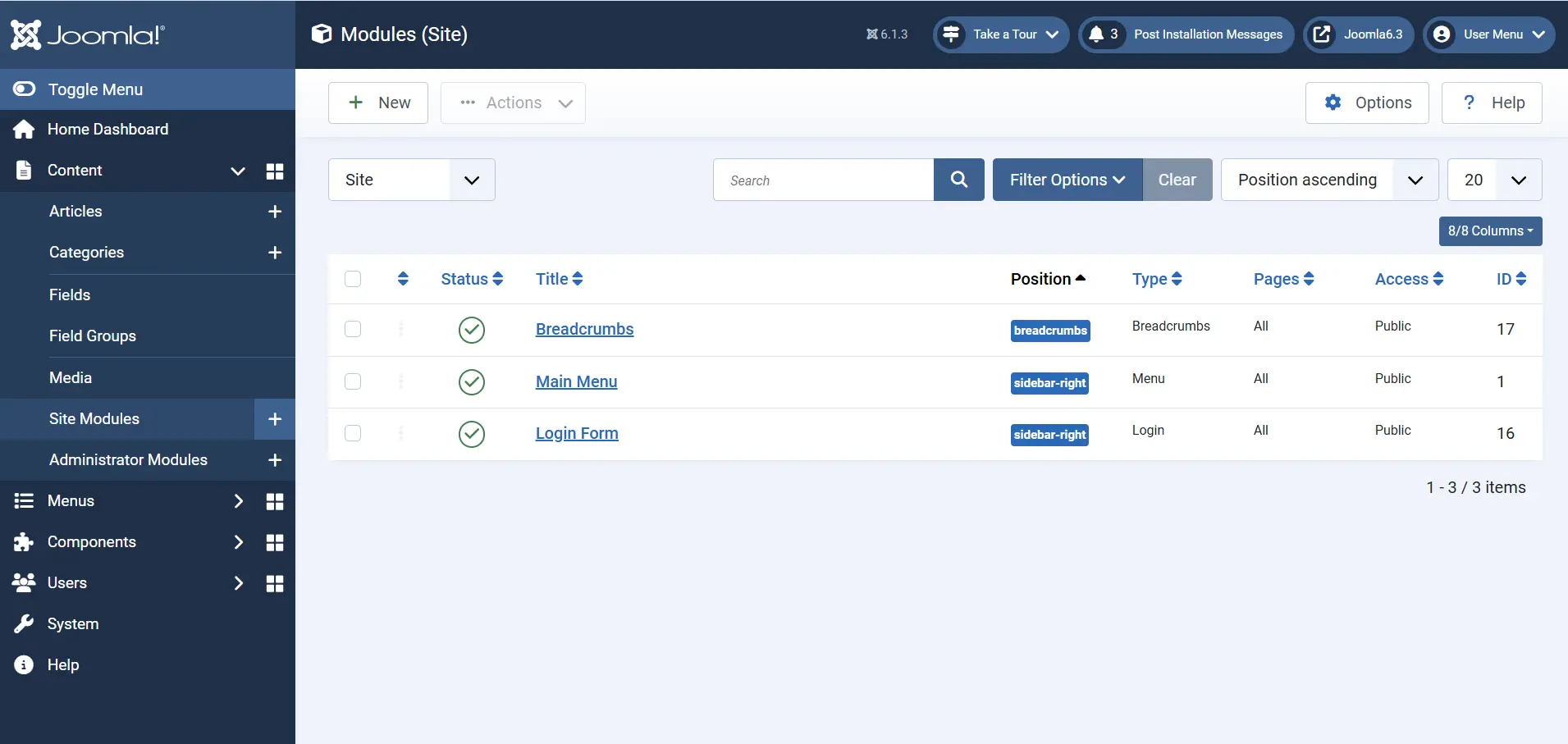
Administrators can create, edit, publish, unpublish, and assign these modules directly from the Joomla backend.
Where to Manage Joomla Modules
Navigate to:
Administrator → Content → Site Modules
From this screen you can:
- Create modules
- Edit modules
- Publish or unpublish modules
- Assign modules to menu items
- Select module positions
- Configure module settings
- Control user access levels
Common Joomla Modules
Article Modules
Article modules help display Joomla article content throughout your website.
Latest Articles Module
Displays the most recently published articles.
Common Uses
- News websites
- Blogs
- Company websites
- Recent updates section
Most Read Articles Module
Displays articles that have received the highest number of views.
Common Uses
- Popular content sections
- Blog sidebars
- Frequently viewed resources
This module helps visitors discover content that is already popular with other users.
Archived Articles Module
Displays articles that have been archived.
Common Uses
- News archives
- Historical announcements
- Event archives
- Older blog posts
Related Articles Module
Displays articles related to the article currently being viewed.
Common Uses
- Content recommendations
- Internal linking
- Increasing page views
- Improving content discovery
Navigation Modules
Navigation modules help visitors move around your website.
Menu Module
The Menu Module displays Joomla menus on the frontend.
Common Uses
- Main navigation menu
- Sidebar navigation
- Footer menu
- Member-only navigation
The Menu Module is one of the most important modules on any Joomla website.
Breadcrumbs Module
Displays the visitor's current location within the website hierarchy.
Example
Home → Blog → Joomla Tutorials → Core Modules
Common Uses
- Better navigation
- Improved user experience
- Easier content discovery
- Enhanced SEO structure
User Modules
Login Form Module
Provides a login form for registered users.
It can also display links such as:
- Forgot Username?
- Forgot Password?
- Create an Account
Common Uses
- Member websites
- Client portals
- Intranet websites
- Community websites
This module is often placed in a sidebar or dedicated login page.
Search Modules
Smart Search Module
Provides a search interface for visitors.
Common Uses
- Content-heavy websites
- Documentation portals
- News websites
- Large blogs
Visitors can quickly find content without browsing through menus.
Feed Modules
Syndication Feeds Module
Provides RSS feed links that allow visitors to subscribe to website content updates.
Common Uses
- Blogs
- News websites
- Content publishing websites
Feed Display Module
Displays content from an external RSS or Atom feed.
Common Uses
- Industry news feeds
- Partner content
- External blog updates
This module allows content from other websites to appear on your Joomla website.
Wrapper Module
The Wrapper Module displays an external webpage inside an iframe.
Common Uses
- External applications
- Embedded portals
- Third-party tools
- Legacy systems
Note: The external website must allow iframe embedding.
Custom Module
The Custom Module is one of Joomla's most flexible modules.
It allows administrators to display custom content in any module position.
You Can Display
- Text
- Images
- HTML
- Videos
- Promotional banners
- Announcements
- Call-to-action sections
- Social media links
Common Uses
- Marketing banners
- Contact information
- Advertisements
- Custom widgets
- Homepage promotions
Because of its flexibility, the Custom Module is one of the most frequently used Joomla modules.
How to Create a Joomla Module
Step 1: Open Site Modules
Navigate to:
Administrator → Content → Site Modules
Need Help Setting Up Joomla Modules?
Not sure which module to use, where to place it, or why it is not showing on a page? Our Joomla developers can set up your modules, positions and menu assignments for you.
Get Help With Joomla Modules
Step 2: Create a New Module
Click New.
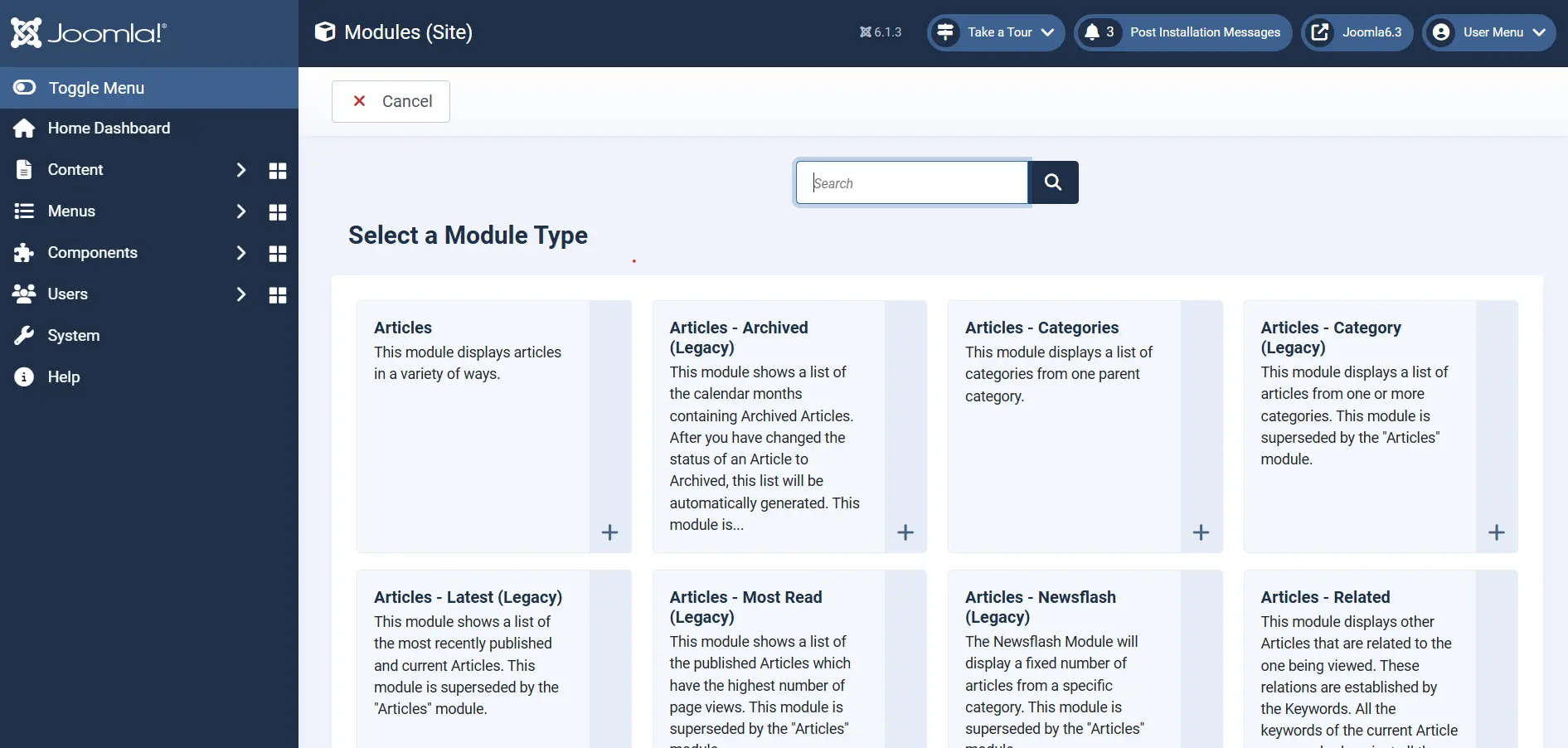
Joomla will display a list of available module types.
Step 3: Select a Module Type
Choose the module you want to create.
Examples:
- Articles - Latest
- Menu
- Login Form
- Smart Search
- Custom
Step 4: Configure the Module
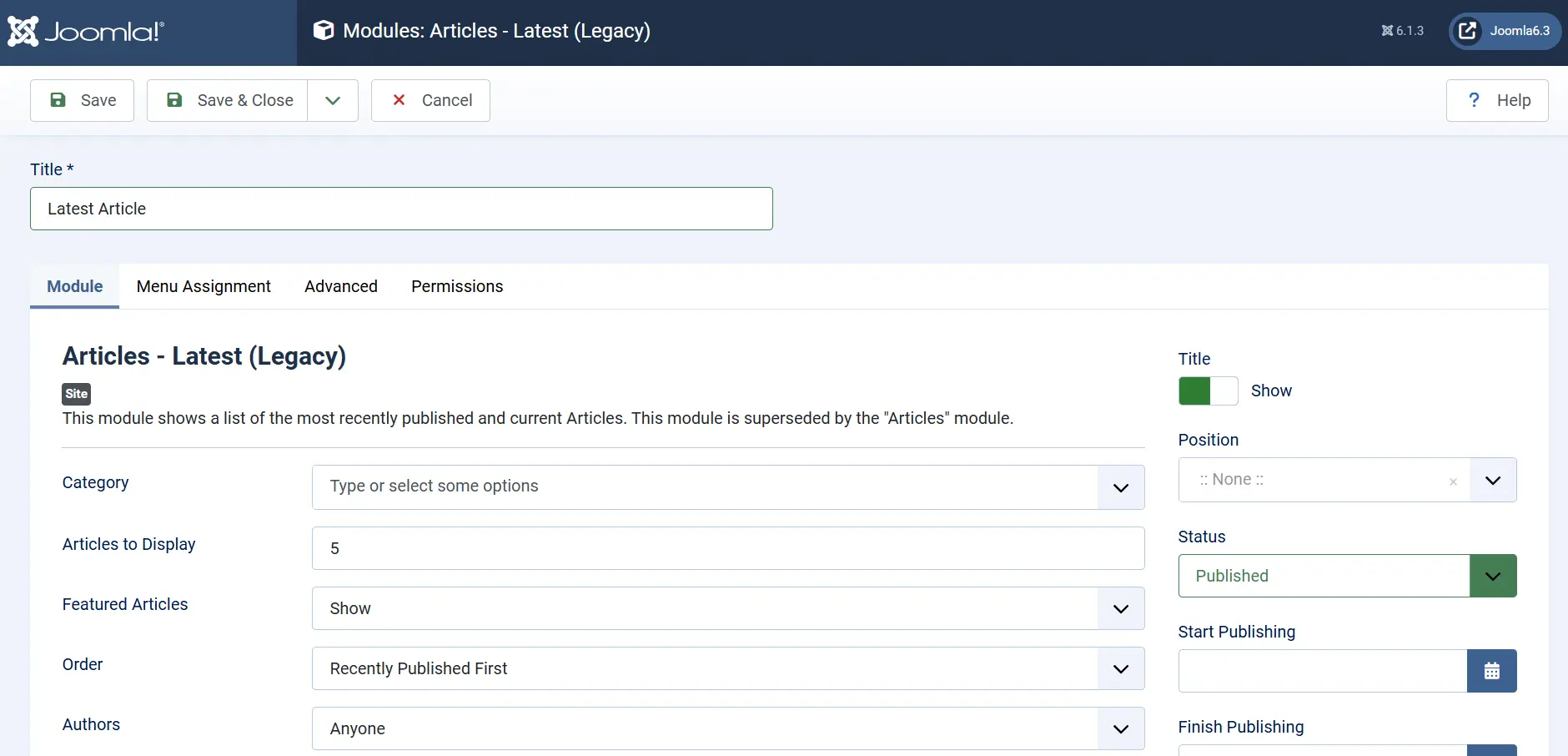
Configure the settings specific to the selected module.
For example, when creating an Articles - Latest module, you can configure:
- Categories
- Number of articles
- Ordering options
- Date filters
- Access levels
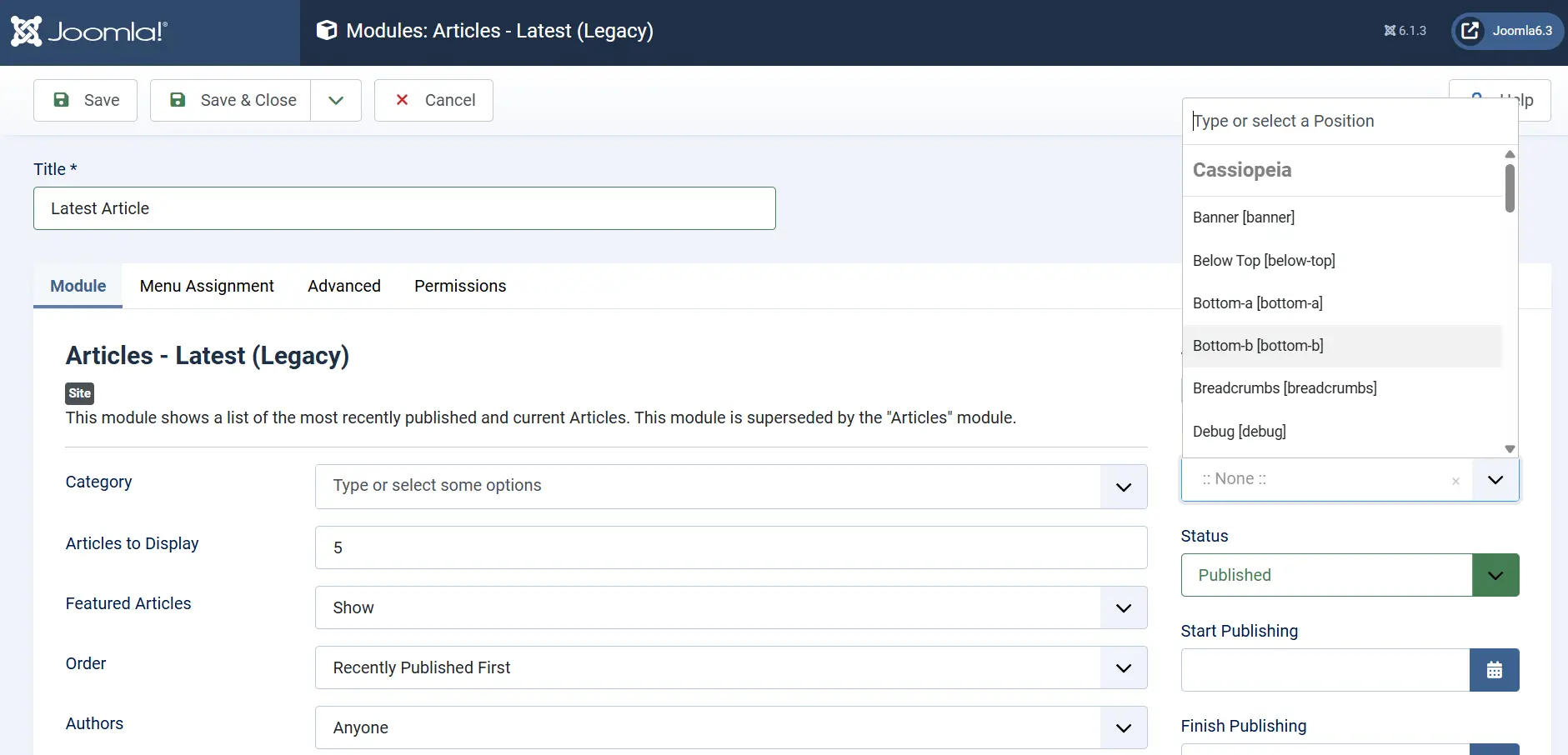
Step 5: Select a Module Position
Choose where the module should appear.
Examples:
sidebar-right
sidebar-left
top-a
top-b
footer
header
Available positions depend on the Joomla template being used.
This is one of the most important configuration steps.
Step 6: Configure Menu Assignment
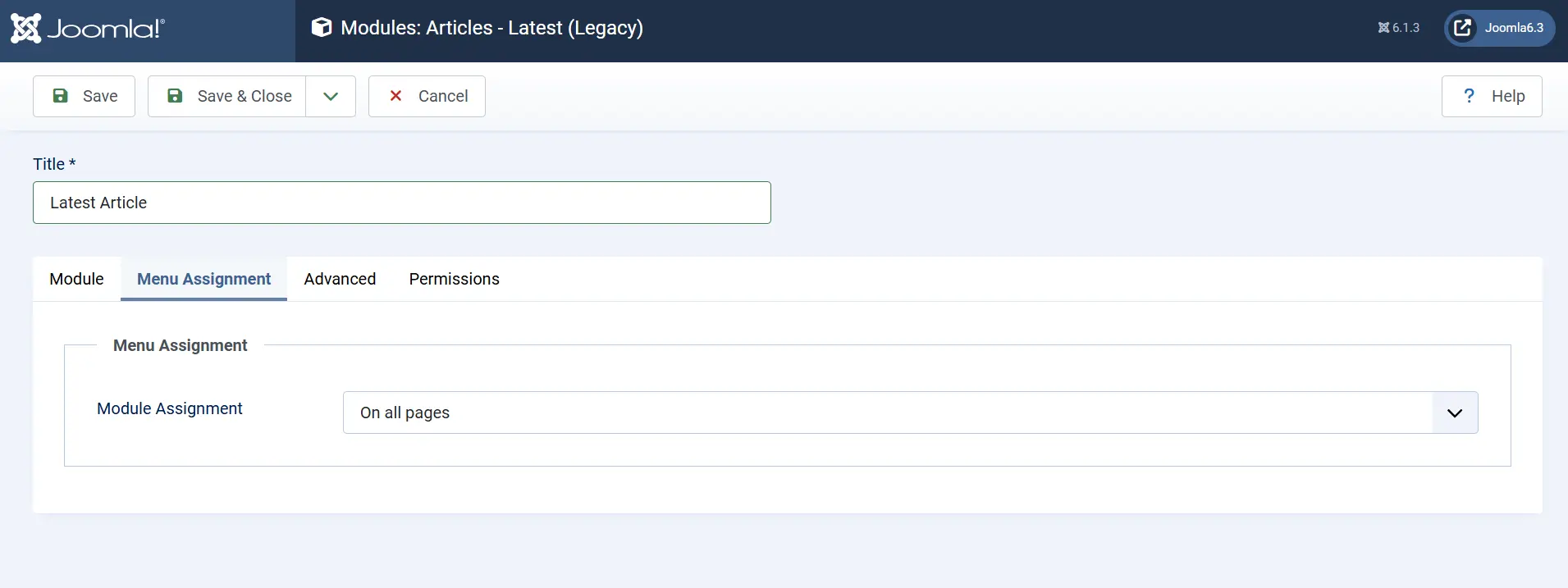
Open the Menu Assignment tab.
Choose where the module should appear:
- On all pages
- On selected pages
- On all pages except selected pages
This allows different modules to appear on different parts of the website.
Step 7: Publish the Module
Set the module status to:
Published
Save the module.
Visit the frontend to verify that it appears in the selected position.
Benefits of Joomla Modules
No Additional Extensions Required
Most common website features are available immediately after installing Joomla.
Flexible Positioning
Modules can be displayed anywhere supported by the template.
Menu-Based Visibility Control
Show modules only where they are needed.
Better Website Navigation
Modules such as Menu, Breadcrumbs, and Smart Search improve user experience.
Reusable Content Blocks
Create content once and display it across multiple pages.
Easy Administration
Modules can be managed entirely from the Joomla administrator interface.
 Want a Joomla Site That Stays Fast and Stable?
Our Joomla maintenance plans keep your site updated, monitored and supported, so your modules and extensions keep working after every update.
See Joomla Maintenance PlansConclusion
Joomla Core Modules provide a powerful and flexible way to display content and functionality throughout a website. From navigation menus and login forms to article listings, search tools, and custom content blocks, these built-in modules help administrators build professional websites without custom development. Understanding how modules work, where they are displayed, and how to assign them to menu items is essential for effective Joomla website management.